Showing posts with label Homeschool - Planning. Show all posts

Monday, August 13, 2018

Planners I Have Loved


Let's talk about planners!

Planners are very important to a home schooling mom. Over the years I have had the opportunity to try out many planners. I have been able to try planners that included everything in one place (home school plus meal planning, medical appointments, and all outside activities) vs. having one planner for school plans in one place, a family calendar on the wall in the kitchen for family commitments, and a list on the fridge for the meal plans for the week. I have tried a computer-based planner that anyone in the family could tap into from any device vs. all planners in print, whether printed out from a word document or written out by hand.

What method works best? Is it a question I can answer? Or is it an answer that varies from year to year?

At one point in my life, with three kids at home (one high school, one middle school and one pre-school), I lived by a schedule similar to the one recommended in the book Managers of Their Homes.
I had a column for each day of the week, with the first column indicating time of day. Each activity had to be scheduled, with time on the schedule for driving. It varied from year to year but went something like this: Child #1 had co-op on Wednesdays and Fridays from 9:30 - 11:30 and violin on Tuesdays from 1:00 to 2:00. Child #2 had flute on Thursdays at 11:00. On Mondays I took child #3 to gymnastics at noon to 1:00. Everyone had 4-H first Wednesday night of the month; and the girls had the church girls program every Monday night. #1 had care group on Tuesday nights, and mom and dad had care group on Thursday. There was a care group leaders' meeting once a month on Fridays, and periodically a church meeting on Sunday evenings. Busy days! I color coded with highlighter to show which child did which activity at a glance.

I could not have survived without my planner, right down to the weekly menu plan, which I kept on the kitchen calendar. Regular updating of the plans was essential.

Years change, and there have been issues of getting non-drivers to jobs or driver's education classes. There have been times of having three drivers and two cars, and making sure someone who needed a car to drive did not get left with an empty driveway and a commitment they were unable to fulfill. 

Years have passed and students have graduated. As we got down to one student only, scheduling got easier, but it is still just as important. Meal plans are still essential to reduce food waste and to minimize unexpected fast-food meals! There have still been church commitments, Boy Scouts, Civil Air Patrol, and additional activities to keep track of.

Last year I was delighted to be able to use Homeschool Planet for most of the year. Yet I found my family inflexible -- they never did learn to log in to check the schedule. They did not add their activities, and they did not look there to see what was going on.

The planning method I have gone back to through the years has been a redundant method. It sounds like extra work, but I keep a calendar in my purse to record things when I am out, and I try always to keep the kitchen calendar up-to-date with my commitments on my purse calendar. I don't like to use a cell phone calendar, because I like to see the entire month at-a-glance. The phone calendars show a dot if there is an activity, but it can mean some obscure aunt's birthday. I don't like having to open the day to see the entry, and I don't like having to check all the hours to see what's coming. I also don't like the mistakes where I have missed something because it got entered as PM instead of AM or vice versa.

For school work, I loved creating a word document for a 36-week daily lesson planner. (I am willing to share my template to those who ask by comment below.) 

I used to keep my dinner menu plans on my kitchen calendar. Now I create my menu plan weekly on a word document, where I also create my shopping list, which gets printed out. After the shopping trip, we fold the paper so the plan shows and post it on the fridge.

So what planners have you used and loved? What are you doing this year? My so is starting college, so I created a Word document for him with the format I discussed above; first column is hours of the day, then a column for Monday through Friday with commitments listed in each column. I am hoping he will find this helpful.

So what kind of planner will you use this year? Do you like to write out your plans in a school planner? Do you double with a calendar? Do you create a word document? Do you use an on-line planner?


Whatever you use, happy planning to you! I pray you have a wonderful school year this year!

http://schoolhousereviewcrew.com/planning-planners-and-preparing-for-the-new-homeschool-year-blog-link-up/

Thursday, June 22, 2017

Homeschool Planet - A TOS Homeschool Crew Review

Review Crew
Back in May I learned I would get to be on the review for Homeschool Planet.

The product we received to review was a one-year subscription to Homeschool Planet.


I had the opportunity to review Homeschool Planet in the past, and I wanted to review them again to see the improvements and changes that have been made.

As soon as I received access I began entering information. To begin, I entered the information for our busy summer. The student is taking a college summer semester course through the dual enrollment program. His class meets Monday through Thursday, 8:00-10:00 a.m. I found it possible to enter this information. Either this feature has been improved or I just didn't figure it out before. There is an option, now, to select which days of the week the class will meet. Later you can adjust time on specific days.
For example, in the fall my student has a class that meets on Tuesdays and Thursdays. I created the class indicating that it meets from 12:30-2:00 p.m. However the class only meets at this time on Tuesday. On Thursday the class meets from 1:00-2:00 p.m. It was easy to go in and make that adjustment.
As the day goes by, the color fades, making it easy to see where you are on the schedule.

Once a week an email is sent to each email address you've given the program, letting the individual know what's coming up for the week.

In addition the program generates a daily email showing what's coming for the day. 
In addition I found that you can use your Homeschool Planet desktop to send messages. So, for example, last night I signed my son up to take the SAT on August 26. I went to my Homeschool Planet schedule and put it on the schedule. At that time I could have also sent my son a message letting him know I got it scheduled and when. (In this case I know my son wants to finish his summer school class next week before I talk to him about any other upcoming school events.)
In addition I found I can add a widget for a shopping list, which I did. This is going to be so helpful for me! When I'm ready I can print the list or send the list! If my husband calls on the way home from work and says, "Do you need anything from the store?" I can email the list to him. It wants me to put a store name down, and I think it should be able to have a list for more than one store. I guess I would add another "Shopping" list widget to do more than one store list.

Also, did you notice my background color change? The original color was very pink, and I found a way to change it to a pale blue that I like better.

Homeschool Planet has a new feature: Lesson Plans. For the month of June, anyone who tries out the "Free 30 Day Trial" receives one free lesson plan. I was planning to use BJU Geometry next year, and Homeschool Planet has a Lesson Plan for that, so they gave me a BJU Geometry Lesson Plan to try out.

Things are always hopping here, and before I could enter my BJU Lesson Plans into Homeschool Planet, we had to have a family meeting with the student about Geometry. The student and the teacher were both struggling with working together. The student feels the teacher doesn't teach well, doesn't have a plan, and doesn't adequately hold the student accountable. The teacher does have a plan, feels the student doesn't respect this teacher the way he does other teachers, and concurs there is difficulty with accountability. All concerned decided to enroll the student in Geometry as an outside class with a local organization that conducts classes for home schooled high school students.

We did. So now we are no longer going to be using BJU Geometry. We are going to be using Saxon. I found Saxon Lesson Plans on Homeschool Planet, but not Saxon Geometry. It really wouldn't matter -- my son is going to need to follow the Syllabus handed out by his class, so I'm not sure a pre-created Lesson Plan would work for the class my son will be taking on Tuesdays and Thursdays.

I still needed to be able to try out the Lesson Plan for BJU Geometry so I could tell you about it, because I  had agreed to do that. So rather than muck up "J"s schedule with a class he is not really taking, I created a second profile for him called JD to use to set up the BJU Geometry Lesson Plans.

I was able to set up the Lesson Plan with ease once I had watched the Lesson Plan Tutorial. 


And at the end of the tutorial it mentioned that there are a lot of tutorial videos available for Homeschool Planet. I had known that but had not previously found the tutorials. I have found Homeschool Planet intuitive enough to use without instructions, so I was doing fine before, but now I know I will be watching tutorials. I'm sure there is a lot I still don't know yet about Homeschool Planet that I will learn from them.

I am normally a paper planner type of gal, but I am just loving Homeschool Planet. I have learned how to log in from my iPhone, so now I can schedule things without having my paper planner. My phone is always with me! This is great! I am so thankful I had this opportunity to use Homeschool Planet for this, my last year of home schooling. I already don't know how I'll live without it next year. ::sigh!::

I highly recommend Homeschool Planet to you for your home school and your life! Go take a look and try it out for free for 30 days. Receive one set of Lesson Plans for free. I think you are going to love it like I do.

Other members of the Old Schoolhouse Homeschool Review Crew also reviewed Homeschool Planet. To read additional reviews please click on the button below.

Homeschool Planet {Homeschool Buyers Co-op Reviews}

Crew Disclaimer

Thursday, June 23, 2016

MySchoolYear.com - A Schoolhouse Crew Review

Review Crew
This spring I learned there was a product available for review being offered by MySchoolYear.com.

I just love trying out planners, so I was delighted when I was selected to review My School Year (Homeschool Record Keeping). I received a 12-month subscription in exchange for my review.


When I received access to My School Year, I had to think about how I wanted to use it during the review period. It was May, so one might initially think I'd start planning my next school year. I decided that was not my best way to use it at that time. There were too many unknowns about next school year at that time, so I decided to plug in information from the current (soon to end) school year.

When you first begin with My School Year, you start by setting up a school year. I set up a school year for 2015-2016 and a school year for 2016-2017, but then I focused on 2015-2016. (I looked at next year but couldn't decide on anything, not even start and end dates, so last year it is.)

So to begin, as inferred above, I entered the start and end dates of the 2015-2016 school year. Next I entered holidays and breaks. We take a week at Thanksgiving, one in the spring, and two weeks at Christmas. We started the day after Labor Day, and take Memorial Day. The end date is rather squishy, as we are still working on subject that suffered some neglect during the school year, but I marked it to end 6/17/16.

Next I clicked on "Enroll Students" as you see in the photo above. My student doesn't like his name to show in my blog entries, so I cut that off. When you set up the student, you enter an email address. After scheduling assignments your student(s) receive emails with their assignments in them. How cool is that?

From this point I set up subjects studied during the year and curriculum or other resources used. Set up asks for class time. We don't adhere to that type of schedule, so I entered arbitrary times.


As you can see, I entered his English 101 dual enrollment class grade from the local community college. You are able to enter grades either by the assignment or by an override you can enter the grade for the complete course.

Then I had the decision to either enter information for every class, every day, every subject, every assignment... Or come up with some other plan. I decided to enter summary grade information - tests, quizzes, homework, attendance, etc. To pick an easy subject, I decided to start with Art, and discovered I had Art listed twice. ::sigh:: Fixed it. Not changing photo.

Set up asks for class time. We don't adhere to that type of schedule, so I entered arbitrary times.

My School Year has so much potential for use in ways I'm not using it yet. For instance, next year two of his dual enrollment classes meet Monday, Wednesday and Friday at specific times. Scheduling that is easy to do with My School Year.
-------------------------------------------------------------------------------------------------------------
Clicking on "actions" on ENGL 102, I get the following:
-------------------------------------------------------------------------------------------------------
I selected "Edit Class Details" and got this screen:
------------------------------------------------------------------------------------------------------
Choosing "view other settings" gave me this screen:
--------------------------------------------------------------------------------------------------
On this page, selecting "Dual Credit" sets it up so it will show that way on the transcript, which My School Year will also generate when you ask it to. I was looking for a way to enter beginning and ending dates for the semesters, but the program picks this information up based on dates entered to indicate assignments due. Where there are no assignments, there is no notation of the class on the student's reminder emails. I don't entirely understand it yet, but I'm sure using it will give me understanding. Most of my review period has been between these semesters.
---------------------------------------------------------------------------------------------------
So... I really like My School Year. It has proven to be very intuitive and easy to use. When I needed help and called them, I got a real person and immediate assistance with my questions!

With My School Year there are quick ways to schedule assignments, and quick ways to bump them forward. You can schedule assignments in advance, or you can record them as you do them. You can use the program to keep track of time spent by the student on each subject. You can record grades by the assignment, or you can just enter the entire grade for the year, useful for creating a transcript after the fact. I can go back and enter 9th and 10th grade year-end grades and know my transcript is humming!

So My School Year is an absolute winner in my house. I hope you will consider it. I'm loving it.

Other members of the Review Crew also reviewed this product. To see other product reviews, please click the button below.
Homeschool Record Keeping {MySchoolYear.com Review}
Crew Disclaimer

Thursday, June 2, 2016

Hey Mama! Planner - A Schoolhouse Crew Review

Review Crew
In March I learned there was a review coming up for The Old Schoolhouse.

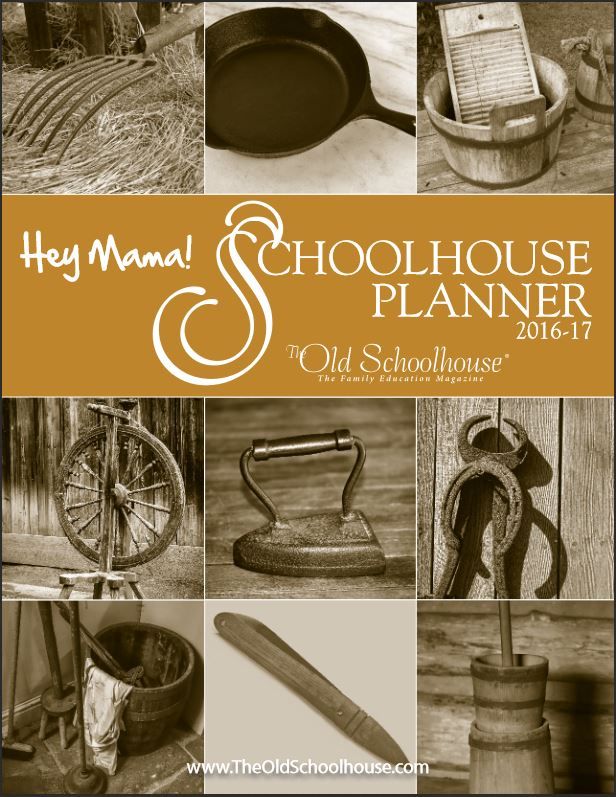
They wanted folks to review the new Hey Mama! Print Schoolhouse Planner 2016-2017 It wasn't even printed yet!

I was happy when I learned I'd been selected for the review. This is a quality product, and I love being able to review it and tell my friends about it.

We were told to expect the planners in April. April came and went, and still no planner. I finally received my planner in mid-May. So I've had the planner just over two weeks.
The due date remained unchanged, though, because it is June, and home schooling Mamas are preparing for the next school year! We want all the mamas to know about the Hey Mama! Print Schoolhouse Planner! So unlike a normal review, where I show my readers lots of completed work, I will show you a little completed work and tell you all about the Planner.

First of all, the Planner is beautiful! It has a nice sturdy double-wire coil (spiral) binding.

Its front cover is glossy, with photos of antique home and farm tools. Scattered through the pages are pages that highlight photographed items on the cover.

The book has 192 pages in it. The first page is a cover page, and then comes the Table of Contents.

There are year-at-a-glance calendar pages for 2016-2018. The first thing I did when the planner arrived was go to these calendars. The size is nice to work with. You can insert family birthdays, doctor/dentist/eye doctor appointments. I went to the internet and searched up the local school system's schedule for next year: start date, end date, holidays, etc. I noted these on the calendar for my own information, even though we don't follow their schedule. This information is always good to be aware of. Then I went to the schedule for next year for the community college my 11th grader will be taking dual enrollment classes, and I noted semester start and end dates for fall and spring. I penciled in our normal break week (Thanksgiving week) in November (altered by a day to adjust for the college's attendance schedule) and the normal 2-week break in December-January. Spring has two break weeks noted: the one for the public school and the one for the college, which we will follow. Birthdays will be entered, and anniversaries.

Scattered through the pages are encouraging notes to the Mama to read and think about.
There is a section of month-at-a-glance calendars for July, 2016 to June, 2017, and each calendar is preceded by a page for notes for the month.

The calendar section is followed by lesson plan pages for 36 weeks, the number of weeks in a school year. These pages are blank to be filled in with dates, days of the week, subjects, and assignments.

I really don't have assignments figured out yet. I'm not even sure of dates to begin, end and all the holidays I will allow breaks for, so these things are not filled in. To let you know how it might look, here is a page from my Hey Mama! Planner from 2014-2015.

The week-at-a-glance planner pages are followed by pages for monthly goals for each month. This is followed by a section with pages to write out semester goals. This is followed by pages for yearly goals. Each child gets pages in each section, and if you don't have enough pages you are allowed to make copies so you have enough.

There is a section to keep track of attendance, pages provided for two kids. This is (obviously) blank now, since next year isn't here yet!
This is followed by a section to keep track of books read by each student. Here's my page from the 2014-2015 planner.

The reading pages are followed by pages to use to plan out the curriculum you will use during the year for each subject for each child. There is a page to use to write down name, address, phone and email of your Homeschooling Contacts. There are some inspirational pages with writing prompts and story starters, followed by informational pages about the thirteen colonies, a timeline of inventions, U.S. Presidents and their wives, branches of government, and states and capitals.

Helpful for high school is the section on "Creating an Academic Transcript". This is followed by actual forms to use for making the transcript! Next is a section with checklists and skills learned for each child. The last page is a page for "other courses".

What I love:
  • I love the format of the weekly planning pages!
  • I love the informational pages and the the inspirational messages scattered throughout the planner.
  • I love the pages for books read.
  • I love the month-at-a-glance calendars.
Ways this could be improved:
  • I'd love it for the cover page to have a place that said something like, "This Planner belongs to: ________________________________". That way if I was working on it at Boy Scouts or somewhere, if I misplaced it folks finding it would know who to return it to.
  • I'd like the planner better if it had a full 52 weeks worth of planning sheets for the school year.
It's June! Now is the time to buy your planner! What do you need to know? You can get $10 off if you buy before July 15 using the following coupon code:

So think about it. This is a great planner.

Other members of the Review Crew also reviewed this product. To see other product reviews, please click the button below.
http://schoolhousereviewcrew.com/hey-mama-schoolhouse-planner-2016-2017-the-old-schoolhouse-review/

Crew Disclaimer
3