Showing posts with label Homeschool Reviews; TOS Crew. Show all posts

Wednesday, August 26, 2015

When Worlds Collide: A Schoolhouse Crew Review

Review Crew
I've been receiving emails with writing tips from Sharon Watson for some time now, so I was delighted to learn that I would get to review a product from Writing with Sharon Watson.
Writing with Sharon Watson Review

The Review Crew had the opportunity to review Illuminating Literature: When Worlds Collide by Sharon Watson. The products we received were:

Illuminating Literature: When Worlds Collide: Student Book
Illuminating Literature: When Worlds Collide: Teacher's Guide
Illuminating Literature: When Worlds Collide: Quiz and Answer Manual
Illuminating Literature: When Worlds Collide: Novel Notebook (Free PDF Download)

Writing with Sharon Watson Review
The author also very kindly sent us the first two books covered in the curriculum: 
Pudd'nhead Wilson, by Mark Twain and The War of the Worlds, by H.G. Wells.

I requested this review because I was intrigued by the literature choices. I am quite familiar with Mark Twain, but I had never heard of Pudd'nhead Wilson. I already possessed a borrowed copy of The War of the Worlds but had never used it as a high school literature choice. 

Now we all know that delight when a box of new school materials arrives on the front door-step. There is that anticipation as you gently slice through the packaging tape. But I have to tell you, the "Wow Factor" of this program jumps out at you when you fold back the flaps of the box. This cover and the color combinations are just stunning. I still love looking at the photo of--well... canning jars in a row in some long grass. The jars look like they contain lavender liquid, yet there is a glow at the bottom, brighter than lightning bugs, and maybe a lit candle. Under liquid. How did they do that?
Writing with Sharon Watson Review

Diving into a program like this, with four books and so much content, the first question the student and teacher ask is, "Where do I start?" The teacher has the "Teacher's Guide", and the book that is not specifically marked is the student's main book. The teacher, the bibliophile, lovingly flips through page-by-page, glancing at the cover pages, information about other books, a multi-paged Table of Contents, and lands on a page that begins, "About the Course: Welcome, Teacher!"  A typical student looks at the cover, not opening the book until instructed to, "Go to page ___." If your student is also a bibliophile, he/she may begin the way mom did, flipping curiously through the beginning pages and stopping abruptly, yet with certainty, at Chapter 0, and the words, "Start Here".

Writing with Sharon Watson Review
I liked that from the very beginning. Chapter 0 does for the student what I wanted to do next, tell you the literature choices covered in the program. When Worlds Collide was created based on the concept of creating a once-a-month literature club with teens. Each month the selection will be read, the corresponding literature comprehension materials (in When Worlds Collide) covered, and the students then come together to discuss the book. The books covered in this set are:
  1. Pudd'nhead Wilson by Mark Twain;
  2. The War of the Worlds by H.G. Wells;
  3. The Friendly Persuasion by Jessamyn West;
  4. Peter Pan by Sir James Barrie;
  5. Warriors Don't Cry by Melba Pattillo Beals;
  6. A Tale of Two Cities by Charles Dickens;
  7. Fahrenheit 451 by Ray Bradbury; and
  8. The Screwtape Letters by C.S. Lewis.
I had only read the last two of these myself, and   Tale of Two Cities had been in my mind for use this year. I wanted to read the books myself, not just teach, so the first thing I did was read Pudd'nhead myself as quickly as I could before I handed it off to my son. What an interesting book! My husband was probably amused as I babbled about its content (without giving away all), and I think I interested him enough that he himself will also read the book.

While my son worked on Pudd'nhead, I looked more deeply at the Illuminating Literature materials. As I mentioned, the concept is to create a literature club where the students can discuss the books. One of the methods of doing this can be to create a closed Facebook group (that the parents and students both join). Our Schoolhouse Review Crew did this, and I joined, but I was not able to get my son to engage with this. He does want to home school, and he tries to be obedient and respectful, but he just does not want group situations for home schooling. So, in using the Illuminating Literature program, we had to tweak it to work with my son's style of learning.

There are different methods of working through literature guides. My personal preference is to have the student give the book a quick read, and then to go through it a second time while they fill in the answers to the questions in the student book. I do not think I have met a student who likes this method, though, as the student does not want to read the book twice. The second method is to assign chapters and corresponding questions, having the student answer the questions section by section. A third method, which I am encouraging my student to use, is to read the question section first, then read a section of the book. The student can stop and right down the answers whenever he wants to, because he already knows what the questions are. This method also prepares the student for taking college entrance exams like the SATs or ACTs.

The author also has an on-line quiz feature that corresponds to the Quiz and Answer Manual that I received as part of the set. I like having the Quiz and Answer Manual so that I have written documentation to keep in my son's 10th Grade Portfolio. Sometimes colleges wish to see the student's actual paperwork, not just the grade the teacher has recorded. The quiz material is broken up into a "Yes I Read It" Quiz and a "Literary Terms Quiz", followed by an "Opinion Survey" (which is graded for "participation", not for their opinion choices).

Writing with Sharon Watson Review
The grade for each literature selection's chapter is based on not only the above three items, but also for the quality of their participation in discussions, completion of lessons and assignments, completion of activity assignment, and completion of the book. The student knows in advance what contributes to the grade, making it easier for the student to know where to apply himself to get the better grade. I like that a lot. I think it is helpful for the student.

The chapter for Pudd'nhead contained seven chapters to be completed in four weeks, which confused me. Fortunately the author was way ahead of me, putting in a "Before You Read the Book" section a guide that stated, "Week 1: Complete Lessons 1-4; Week 2: Read chapters I-XII of Pudd'nhead Wilson; Week 3: Read chapters XIII - XXI of Pudd'nhead Wilson; Week 4: Decide on one activity... Complete lessons 5 - 7," etc. I didn't expect Lessons 1 - 4 to be pre-reading work. Who knew! My son was already reading. ::sigh::

Writing with Sharon Watson Review
The fourth book provided, the PDF download, is the Novel Notebook. It is a place for the student to take notes while he reads. You might look at it and think, "I don't need to print this out. My student can do this in a spiral notebook." This may be true. I know printer ink is always a painful topic of conversation in my house. When I opened the Novel Notebook PDF, though, my reaction was, "This is awesome! This would inspire my student! This would not use much ink." So, the buyer gets to make her own decision. I take items of this nature and print out one lesson at a time to reduce overall ink impact, or I put the PDF on a jump drive and head to my local copy store.

I am loving Illuminating Literature: When Worlds Collide. My son is enjoying the literature choices, but the additional work, not so much. He's not much of a literature guy -- more of a science and technology guy. I do think When Worlds Collide will help him enjoy this year's literature more. I am so thankful to Sharon Watson for permitting me to review Illuminating Literature. It gets my highest recommendation. If you would like to have a sample view before you buy,  downloadable samples and information can be found here.

Other members of the Review Crew also reviewed this product. To see other product reviews, please click the button below.
Click to read Crew Reviews
 
Crew Disclaimer

Wednesday, July 15, 2015

Homeschool Planet - A Schoolhouse Crew Review

Review Crew
In May I learned that a new vendor, Homeschool Planet was letting the Schoolhouse Review Crew review their online homeschool planner, Homeschool Planet.

I am a planner. We accomplish more when I get the plan written down in one place, where each day has a list of what to do that day. I learned years ago that my current student sees the written plan as "sacred", such that from the student's perspective, if it isn't already written to the plan when morning arrives, you can't add it. (This does not reciprocate -- he's willing to skip it even if it is written down! ;-)

Over the years I have used pre-printed full-year planners that I purchased, on-line Word planners that I created, curriculum-provided planners that had a separate planner for each subject, and on-line planners that you purchase by the month or by the year.

For many years, my favorite printer was a Word document I created that shows a week view over a two-page spread. It was tedious, time consuming, and I dare not print out more than one week at a time. One change in one subject and I needed to reprint, or I was scratching in by pen.


So much to fill in manually. A missed day and everything had to be moved manually. There had to be a better way!

So I experimented with a planner software where I downloaded the sample, liked it, bought the full software, but could never learn how to use the features that would make it the most useful to me. I gave up on it. I looked at an online planner a friend liked, but I wasn't willing to pay what it cost. I got to try another online planner, liked it, but could see that it was incredibly kludgey, not at all user friendly.

And then along came Homeschool Planet! I am in love!

Homeschool Planet set up begins by having you select and set up your school year. Since I received access at the end of the 2014-2015 school year, I chose to focus on setting up the 2015-2016 school year. You tell the program whether to show weekends or not, show on the right, the left, or split. Next you indicate when your year will begin and end. I wanted to start our school year the day after Labor Day, even though our local school system is starting in August. I need a solid 36-week school year, but I didn't know when it would end, so I left the end in August of 2016 to start. 

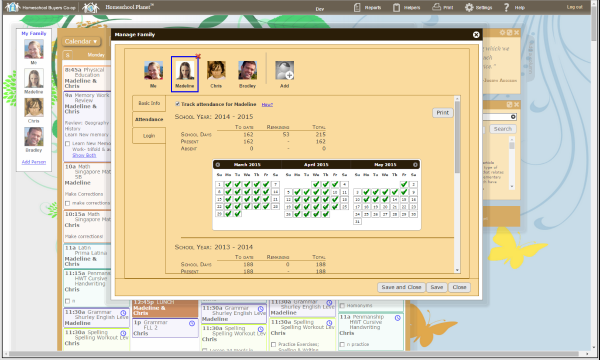
Next, on school-year set up, you decide when you will take holidays and breaks. Here I have always had to go search the internet for a holiday schedule, but Homeschool Planet has holiday schedules as part of the program, whether it is US holidays, Christian holidays, Jewish holidays, or whatever. You just select as many schedules as you want to incorporate, and they appear as days off on your year plan. You can also go in and deselect a holiday, like if I want to do school on Columbus Day, and then select breaks that are down as school days. I like to take a week at Thanksgiving, two weeks at Christmas, and another week after Easter. Later, this same feature enables you to show your student's attendance if you need this information for reporting or for a portfolio or review.

Next you set up your students. That is quick for me. I have one. It also gives you a profile for yourself, the teacher, and I set one up for my husband as well. That way I can keep track of things my husband has scheduled and always see how they dove-tail with my school plans.

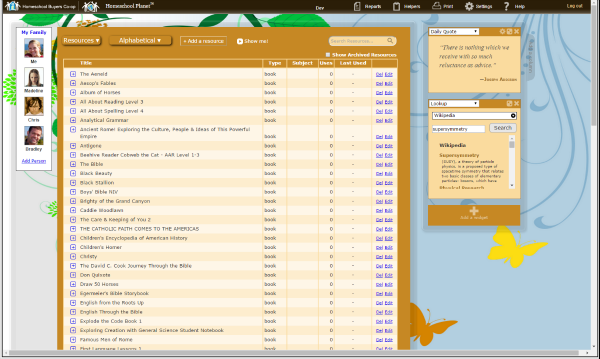
Certain items of the set-up can probably be done in any order. You still need to enter the courses your student(s) will take, as well as the resources you plan to use (textbooks, websites, etc.). There is a fabulous textbook feature that if you enter the ISBN, the program will look up the book and autofill the textbook information! Very nice!

When I initially set my plans up, I was actually trying to set up for my son to complete his Algebra over the summer. When you get to the place where you are inputting assignments, there is a way to enter the information so the program completely autofills the assignments to the end of the year. This works for subjects that have a pattern, like Math programs:

Monday, Lesson 1a
Tuesday, Lesson 1b
Wednesday, Lesson 1c
Thursday, Lesson 1d
Friday, Lesson 1e, Test 1 

I was trying this starting at Lesson 91, with a test on the same day as every lesson ending with a zero (Lesson 100, Test 10). When I tried it, it totally renumbered assignments. I wish I could explain to the customer service people at Homeschool Planet exactly what it did, but I was too impatient and just gave up and entered those lessons manually. I figured it is just a glitch, and that the program works when you enter the lessons starting at "1", but that starting at "90" confused the programming somehow.

So I turned my focus to next year's school year. I still have a lot of information to enter, but I got Algebra II assignments inputted, but the assignments did not lend themselves to following a pattern that I could see. I also wanted to enter all the information my son would need, so I entered these manually. A typical assignment looks like this:

2.2 Graphs of Linear Equations (pages 63-68); Quiz 1 (2.1); Graphing Calculator: Graphing Linear  Functions from Equations; TTK CD: Visuals

All those notes will be helpful for both my son and I, so I entered them. For some subjects, entry will be very easy throughout the year (Lesson 1, Lesson 2, etc.), but for courses that you want to enter more information you have that freedom.

As the school year cranks along, you can set the program up to mark assignments completed automatically when the date goes by. I can absolutely not do that. So when I log in, I will get a message telling me the date for completing the assignment has passed, and giving me the option to mark the assignment complete or bump the assignment to the next day. I love this! I think my son's log in gives him the option to mark the assignment complete and to enter how much time he spent on the subject, but I don't think I'll ever get him to log in to the program.

Homeschool Planet Review

*****************************************************************************
Features that I absolutely love:
  • Missed a day? Just tell the program and it gives you the option to do two lessons the next day or it will bump all assignments forward a day for you.
  • Change you plans and find you have a gap with no assignment? It will fill that gap automatically, shifting one or all assignments forward for you.
  • Working on your school schedule and remember something you need at the store? It will keep a running grocery list on the side of your workspace!
  • Ever schedule school work for Friday morning only to realize you have to take the student to the orthodontist that day? This program allows you to enter all your appointments into the schedule and will then integrate and overlay so you can see conflicts and adjust.
  • Not a "9:00-Math; 10:00 - History" kind of gal? You can enter all assignments by day without assigning a time to the assignment.
  • Ever hear, "I didn't know what my assignment was! I didn't know where to find it!"? Homeschool Planet will send your student a daily email of their assignments for the day! This is EXACTLY what I have been needing! (My student is in 10th grade.) Now if I could only get his to read his email... You can even give your student a log in and password, and give them limited access to features according to what you want them to have access to.
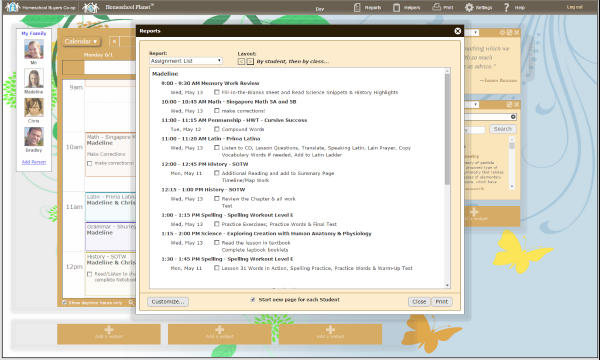
  •  If you can get your student to log in, and to mark off assignments as they are completed, then you can run a report on your student to see how they are doing on their daily tasks.
  • I haven't worked with it yet, but Homeschool Planet allows you to enter grades, and will calculate final grades for you based on the weighting you tell it to use. Then, later, the program will create your student's transcript for you!
  • Do your eyes glaze over to read long explanations of how to use a new program? Homeschool Planet has a full page of video tutorials.
So, yeah, I am in love with Homeschool Planet. I will definitely be using it this year, and will probably use it for our last two years as well.

Are you interested in trying it out for yourself? Well, how would you like a free 30-day trial that you don't even have to give your credit card number to get? Who does that?

There are so many features to Homeschool Planet that I can't touch on them all. Other members of the Review Crew also reviewed this product. To see other product reviews, please click the button below.
Click to read Crew Reviews
 
Crew Disclaimer

Thursday, June 11, 2015

IEW Deluxe Combo Teacher/Student Writing Package Level C - A TOS Homeschool Crew Review

Review Crew
In April I learned that Institute for Excellence in Writing (IEW) was letting the Schoolhouse Review Crew review some of their newly revised products.
IEW Review
I was amazed at the selection we were given to choose from, and I was delighted when I was selected to review the Deluxe Combo Teacher/Student Writing Package Level C. IEW was amazingly generous in what they were offering the Crew to review. I was also sent FIX-1 & 2,  PLUS A Word Write Now and Portable Walls. (Level C is for students doing 9th-12th grade level work.)
IEW Review

First, before anything else, I want to thank IEW for their generosity! I am still amazed at all that they gave me for this review! The contents of the Deluxe Combo Teacher/Student Writing Package Level C [FIX-1 & 2]  included:
The Deluxe Combo also includes a Premium Code to be used to download additional resources worth a value of $99 if you were to purchase them. (To me it looks like it is worth more than that.) There are many valuable and worthwhile MP3 downloads, as well as multiple PDF downloads to assist the user in implementing the program for years to come.

When the Deluxe Combo package first arrived, I felt overwhelmed. My feeling was a combination somewhere between the delight of piles of packages on Christmas morning and the sense of dread when a college student has just purchased books for the semester. Wow!
***********************************************************************************************
I had had the opportunity previously to experience Teaching Writing: Structure and Style (TWSS) in its earlier format. I had purchased TWSS and SWI a few years ago.At that time I found the experience overwhelming. The original format was a one-week seminar where parents were taught, through a series of seminars over the course of a week, how to help their students begin, develop, and excel in their writing skills. However I came away from the experience feeling I could never remember it all It was wonderful, but I felt like a failure because I couldn't figure out how to implement it.

At that time I had purchased Student Writing Intensives (SWI), Level B, in the hopes that between TWSS and SWI I could figure out how to lead my son into becoming a quality writer. The Student Writing Intensives was set up the same way as the Teaching Writing with Structure and Style. It was filmed over the course of a week, where students sat in a classroom under the instruction of Andrew Pudewa, and over the course of a week Mr. Pudewa walked them through a process to help them succeed at writing. At that time my reaction was that: 1) I did not have a week where I could let my student focus on only writing to watch the series, and 2) I did not have the ability to break the program down on my own to spread it out over a school year.
******************************************************************************************************
When I had previoiiusly purchased TWSS and SWI, I had given it a try and quit. However I learned, when this review was being offered that the program had been revised, and I wanted to give the program another chance.

All I can say now is, "WOW!" What IEW has done with this program is amazing! I have hope! I'm no longer a failure at teaching writing to my son!

********************************************************************************************
To start, I read the introductory material in both TWSS and SWI. Then I watched the first DVD in TWSS, which is teaching the parent how to teach. Next I reread the beginninig pages of SWI and  setup three notebooks: the Teaching Writing Workbook, the Student Notebook for Student Writing Intensives, and an additional notebook to hold student papers not yet needed, which get handed out as the course progresses. The SWI instructions to the parent said to watch the introductory DVD by myself, and then start watching the first course DVD in SWI with my student.

At this point I got briefly confused. I had already watched an introductory DVD (for TWSS), but I was now supposed to watch the introductory DVD for SWI. I missed that point, so my son's first experience was starting to watch the introductory SWI DVD with me that I was supposed to watch alone. He was very unhappy with it, and it didn't take me too long to realize that I had him watching the wrong DVD. Oops! So I let him go do other schoolwork, and I watched the SWI introductory DVD that day.

So, the next day we were actually able to start the program. (Our tight schedule the first day prohibited starting over that day.) So, my son was already starting out with an affected attitude about doing a program with me that we had tried before and failed at, a program that he had sat through a long session of DVD the day before that had been really boring to him. He was a good sport, though. It did take him several days to warm up to Mr. Pudewa, but soon he was right on board, willing each day to work on the program.
*********************************************************************************************
So, let me explain why the program is better now. It is as if Mr. Pudewa read my mind and knew where I was struggling with these DVDs. The SWI program is set up now in a way that spreads the watching and the work out over a 36-week period. The TWSS is set up in a similar manner in that is now set up to be watched over a 36-week period. It is wonderful. The additional downloaded materials supplement the 36-week program, and the goal is that the teacher and student will learn how to use the program, and then continue to use the program for several additional years until the student is a confident, competent writer.

So, with the new program my student's writing began to bloom. The very first week he produced a fine writing assignment, and the weeks went on from there. I couldn't be happier. My son felt confident and wanted to watch the segments on his own and do the assignments, but that just didn't work. We need to watch together. There are times when the teacher needs to give the student the next reading/outlining/writing resource, and the information didn't get to me. Then my son would say, "I don't know what the assignment was." Clearly I was in the dark and could not help, so once again it is true, "Follow the Directions". The program is designed to be watched by the student AND the teacher, or the teacher can watch the student segment in advance, but the program is not designed to be done by the student independently.

******************************************************************************************************
I have discussed TWSS and SWI. Now let me tell you about the additional products included with the Deluxe Combo. First, there is Fix-It! Grammar. I received physical copies of the Teacher's Manuals for The Nose Tree (Book 1) and Robin Hood (Book 2). I received digital copies of the Student Books for each of these. 

I had the opportunity to review Fix-It! Grammar, Level 3 last year, but unfortunately my son did not have an adequate foundation to start off at Level 3. I was thankful to have this opportunity to let my son establish a good foundation, since I received this time Levels 1 and 2. I started by setting up a notebook for his Fix-It! work, with sections for grammar, vocabulary, etc. as indicated in the directions.

Having already used Fix-It! , my son knew just what to do. He resisted the program in the same places (looking up definitions for the vocabulary). However, he found the required work smooth sailing, though, and this was a pleasant portion of our IEW review.

We also received A Word Write Now, which becomes your student's own thesaurus. It is a beautiful, spiral-bound book. It is not an exhaustive thesaurus, but for selected words gives the student options they might not have thought of.

I really like the way A Word Write Now is made, so nice and sturdy, and the internal format of the content, such that a word like "anger" has choices for noun, verb, adverb and adjective.

A similar tool, Portable Walls is a tool the student can keep in the inside pocket of their notebook to pull out and reference when they need to. It gives quick-helps for each unit as they work their way through SWI. It has "Dress-Ups", "Sentence Openers", "Decorations", "Triple Extensions", "'-ly' Adverbs", "'-ly' Imposters", "Prepositions", "Synonyms for 'Said'", "Strong Verbs", Unit 1-2: "Notes and Outlines", Unit 3: "Story Sequence Model", Unit 4: "Summarizing References", Unit 5: "Writing from Pictures", Unit 6: "Library Research", Unit 7: "Creative Writing", Unit 8: "Essay Model", and "Unit 9: "Critique Writing". That's a lot of content in a fold-out equivalent to three front-and-back pages!

We keep our Portable Walls in the Student Notebook where it can easily be pulled out anytime my student needs a little word help.

I can't say enough about how wonderful this Deluxe Combo is, what a blessing it will be for years to come. I now have confidence that when my son applies to college he will have a portfolio of solid writing assignments available for prospective college recruiters to look at when considering my son for a scholarship. We have only had the program a limited number of weeks thus far, but I am so thankful. I can't wait to continue to dig in deeper in the years to come, and I am enjoying watching my son's writing improve. I don't know if he will ever enjoy receiving a writing assignment, but I have confidence that he will be equipped to complete assignments when he gets to college.
Every year the Crew votes on their favorite products they reviewed over the course of the year. I have to tell you that by far this is my favorite product I've reviewed in a long time -- not just this year! So as you go to your Homeschool Conferences, be sure to stop by the IEW booth and check out the Deluxe Combo set, or just order it off of the IEW website.

IEW has Deluxe Combo sets for all age and grade levels. They also have special sets for Special Needs students. To read more reviews about IEW Deluxe Combo sets and Special Needs products, click on the link below to see other reviews by other members of the Crew.


Click to read Crew Reviews
 

Crew Disclaimer

Tuesday, June 9, 2015

Exploring Creation Field Trip Journal - A TOS Schoolhouse Crew Review

Review Crew
In April I learned that Apologia Educational Ministries was again on the schedule with a product for the Schoolhouse Review Crew. I love Apologia! They have such great products. I've never met an Apologia product I didn't like!
Exploring Creation Field Trip Journal Review

The product this time was the Exploring Creation Field Trip Journal, and in late April I learned that I had been chosen to be one of the reviewers.
Exploring Creation Field Trip Journal Review

This is an easy product to get excited about! It is the size of a spiral notebook, with super sturdy front and back covers. It is on a spiral--seems to be a plastic spiral. Between the covers are 62 sturdy pages that do not bleed through when you doodle, draw, write, and record on them. This is a book made for recording your journeys through art, drawings and photographs.

The journal is broken into many sections:
 
I immediately thumbed through the entire beautiful book before doing anything else! After enjoying the entire colorful display of each section, I settled down to read "Preparing for a Field Trip" and "Field Trip Ideas". These sections really were inspiring, giving me ideas I really hadn't considered for how to use this journal. Between this information and some chats with some other folks using the journal, I began to see ways this journal could be used to keep track of events in my son's life in Boy Scouts and Civil Air Patrol, as well as home school field trips. I was wishing I had had this journal when my girls were in 4-H! Oh, the field trips we used to take with our 4-H group -- the llama farm, the wildlife rescue place, the exotic animal veterinary and farm, berry picking, ice skating, County Fair... the list was endless.

My poor son had asked to go to the zoo a long time ago, and I never got around to it. I began to try to figure out when we would go. But then I began to get other ideas that would work for us. One example is that we needed to visit some spots to help my son decide on some community service organization to do some work for. In my state, public school kids are required to "donate" 75 hours of "volunteer" work (between 7th-12th grade) to graduate. ["Volunteer", by its very definition, means not required, done not out of compulsion but out of a desire to serve others. "Required" hours are therefore not "volunteer" hours, but I digress...]

As homeschoolers, we are not required to serve these mandatory hours of community service, however there are some requirements my son needs to fulfill for a Boy Scout merit badge, so I wanted to visit some organizations for my son to consider for his community service hours.

We live very close to an animal shelter, so our first field trip I was going to record was to this animal shelter.  What was I thinking? We went there, and it went over like a lead balloon. Was I trying to torture my child? (No.) The dogs either looked like they had been beaten and mistreated, poster child for animal rescue posters, or like they had been bred for fighting and wanted to dissect us and chew on our bones. So we went to the other sections, and it was, "You brought me here and you aren't even going to let me go home with something?" What was I thinking? ::sigh::


So, now my son was annoyed. ::sigh:: Well, I had made plans to swing by the wildlife rescue place as well (2nd Chance Wildlife Rescue) to donate some old blankets that I needed to get rid of and that I knew they could use. When my girls were in their teens, 2nd Chance used to welcome us in to see their facility, visit with the resident rescued 'possum, and hand feed the red-headed woodpecker that lived in the cedar out front. Now, granted, that was ten years ago, but the memories are still fresh in my brain.

So we drove down a long residential road to a long gravel road, which ended in an unpretentious farm house with barn and out buildings. We parked and walked up to the door. "Closed" said the sign on the screen door, but someone was inside. "I see that you're closed," I said, "but could I just make a quick donation?" That kind of talk usually opens doors. I was even holding a piece of currency to donate.

"Oh! Does the sign say closed? We're open! I must have forgotten to flip it. Thanks for pointing it out. Come on in." So I presented the blankets and the financial donation, but we got no further than the front desk. "Oh, our back rooms are for employees only. We can't let you back there." I even explained that we were trying to look at places for my son to do community service hours, but by now he was already saying in my ear, "No, Mom. Let's just leave. NOW!"  Again, ::sigh::

So the review period was sliding by, and I was still having difficulty settling on some field trips we could take that I could journal about in my Field Trip Journal. In the meantime, I began coloring the US Map of places my Student has gone. I started by writing some of the two-letter abbreviations down and coloring in states Miner has been to. Epic fail. Mom colors in Nevada and marks it Arizona and colors it in. Out came the "White Out" to rescue me. So my Geography isn't perfect. I couldn't even remember all the two-letter abbreviations. I mis-marked several more states while working on this project; the White Out will not be losing its job in my lifetime. Still waiting for some corrections.

So the book sat, with the US Map partially colored and marked, while I brainstormed about field trips and went on with my busy life. Then my daughter saw the Field Trip Journal. Now she wants my Field Trip Journal when I am done with the review. "If I hadn't journaled my trip to Europe, I wouldn't remember most of what we did!" That trip was in 2006!

My son went on a camping trip with his Boy Scout Troop, but I didn't go with him. He's not interested in doing the journaling, and he didn't take any photographs. Finally we did some Journal-worthy activities. The first was our trip to Baltimore, MD. It started as a visit to the orthodontist (who is at the UM School of Dentistry, which I did not photograph). From there I needed to go to a Boy Scout Shop. There was one nearby, so I used my iPhone to help me find it. We ended up going through a pretty sketchy couple of blocks on the way there (have you heard how dangerous Baltimore is right now with one murder a day?). We finally found the Boy Scout Counsel, only to find the Scout store was across the street.

At the Counsel building there was a great bronze statue of a Boy Scout - photo of my Scout with this statue.


So, we visited the Baltimore Scout Shop.

and we saw a cool stone house across the street.
Then we went through crazy city streets, between way-tall buildings, to get home. I'm still journaling about this trip.
 

I'm still journaling about this trip. It's been awhile since I moved photos from my phone to a jump drive to download an print at the local CVS.
 
All these city streets left me in sore need of the open countryside.

Next Miner wanted to go strawberry picking at a local pick-your-own farm, so we went strawberry picking.

Next trip, Miner's dad and I took him to the Maryland Wing of the Civil Air Patrol in Woodstock, MD to get some dress blues. Unimpressive to look at, no photograph. On the way home Miner and his dad did some Geocaching (locating a Geocache).
While out in this country area we saw many crop fields and barns and such, to help me recover from those Baltimore city streets!
I think Miner's favorite trip was the trip to get his dress blues for Civil Air Patrol!
**********************
Every Apologia book seems to come with a special link code to take you to book extras. This book also has this feature. The book extras page for the Field Trip Journal are amazing! Fabulous links, and an extensive list.

This Field Trip Journal is an excellent resource to create a keepsake to help you remember your journey. There are blank pages for using your own creativity, as well as more structured pages to guide you when you're not sure how to create your page. This Field Trip Journal can be given right to your creative student, or can be used by the parent for the less creative or less engaged student.

This is not an expensive book for what it offers. I highly recommend you consider this resource to complement your homeschool portfolio for the summer or the upcoming year! If we had had it sooner we might have had journal entries for skiing, hiking, camping, summer camp, fishing, boating, and so many other activities! I really love this Field Trip Journal! If you have any questions, just let me know!

 Other members of the Review Crew also reviewed this product. To see other product reviews, please click the button below.
 
Exploring Creation Field Trip Journal Review

Crew Disclaimer
3